A tiny friend
that lives in your notch.
Notchling turns the empty space around your MacBook camera into a pet that reacts to your day. It cheers when you charge, poses for screenshots, and dances to your music.
One payment, yours forever · 14-day refund · macOS 14 Sonoma or later
120 things it notices
It notices everything.
Pick a moment and watch how your pet reacts.
You plug in the charger
Electricity is its favorite snack. Low battery rescues get a hero's welcome.
Your Mac finally has a heartbeat.
It's proud when you focus,
sleepy when you should be in bed,
and dizzy when you shake the cursor.
New in 0.2
It learned four new tricks.
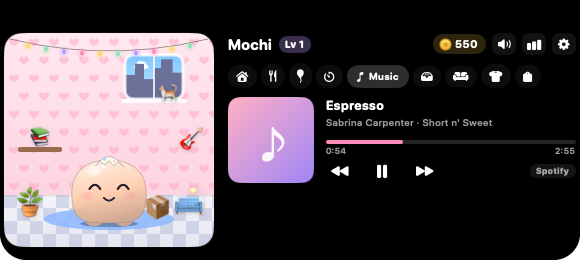
Your pet can now play DJ, look after you, hold your files and redecorate. Free for everyone who has Notchling.
Music in your notch
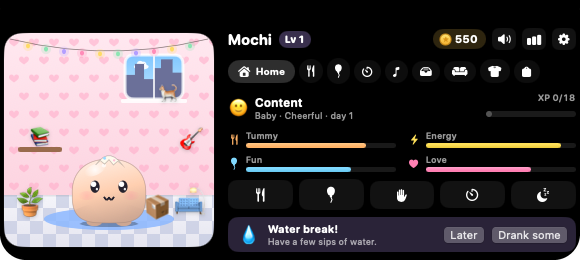
Health reminders
Your pet reminds you to drink water, stretch and rest your eyes. Turn each one on or off. It waits until you're off a call.
- 💧 Water
- 🙆 Stretch
- 👀 Eyes
- 🪑 Posture
- 🌬️ Breathe
- 🌙 Bedtime
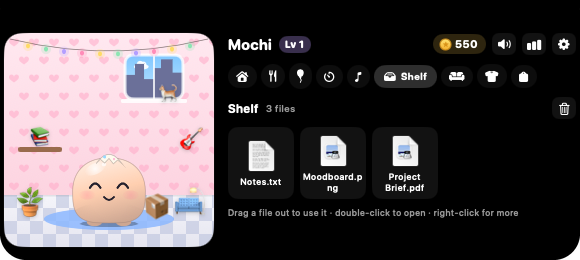
A shelf for your files
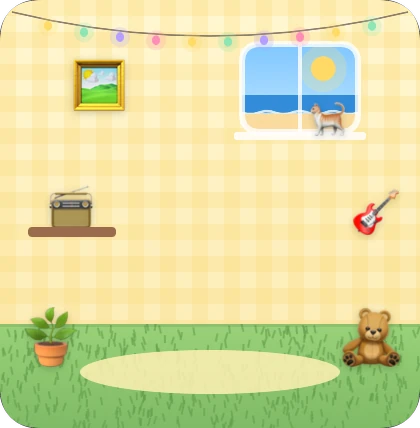
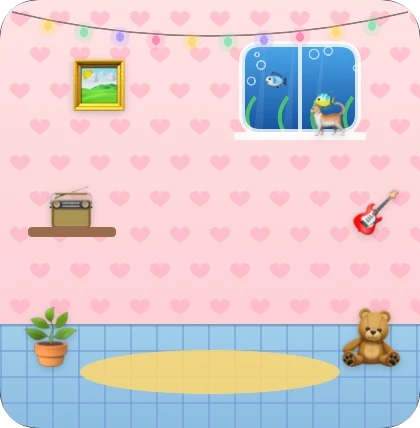
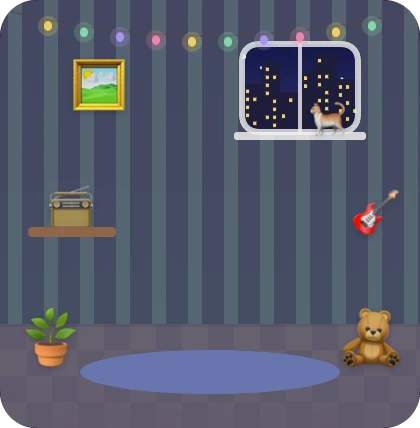
Room makeovers
Small enough for a notch.
Deep enough to love.
280
reactions to 120 things your Mac does
Each with its own face, body motion, sound and a few lines of dialogue, so it rarely says the same thing twice.
30 moods
Driven by four needs and short lived feelings. Right now it feels happy.
Dress them up
132 things in the shop: 22 hats, glasses, scarves, 24 snacks, toys, 12 colors and a whole room to decorate.
Grows up while you focus
Start a focus session and it knits beside you. Open a distracting site and it notices. Finish, and you earn coins and XP. It levels up to 50 and grows from baby to grown up.
Everything stays on your Mac
No account and no tracking. What your pet notices never leaves your Mac. It counts your keystrokes only if you let it, and never reads them.
Polite by design
Silent during calls, quiet hours at night, a chattiness setting, and one tap to mute for an hour.
A voice of its own
Five personalities, each with its own lines and a soft babble voice that sounds like a tiny game character.
68 achievements, stats and a diary
Every night your pet writes a journal entry about your day together: how long you focused, what it ate, and how many screenshots it posed for.
Try it
Meet your Notchling.
This is the real pet, drawn live in your browser. It follows your pointer. Click it, change its mood, try on a hat.
Click to poke
Collect them all
Hatch over a hundred kinds of Notchling.
In the app you buy eggs with coins you earn by focusing. Each one hatches a pet: kitties, foxes, dragons, ghosts, even a rainbow unicorn. Spin this one around, then tap it three times.
Drag to spin · tap to crack
Your collection
0 of 120
Up and running
in about a minute.
- 1
Hatch your egg
Open Notchling and tap the egg three times. Pick a name, one of six colors and a personality: cheerful, sleepy, sassy, shy or hyper.
- 2
It moves into your notch
Your pet settles in beside the camera and starts noticing your day. Hover the notch to open its little room.
- 3
Focus, feed and grow
Focus sessions earn coins. Spend them on snacks, hats and decor, and watch your pet grow from baby to grown up.
Five dollars.
Once. Forever.
Less than a coffee, and it never asks for a subscription.

Notchling
Lifetime license · macOS 14 or later
- All 280 reactions and 30 moods
- Music controls, health reminders and a file shelf
- Focus sessions, coins and levels up to 50
- The full shop: 132 snacks, outfits and room makeovers
- 68 achievements, stats and the nightly diary
- Every future update, free
- No account, no subscription, no tracking
Not smiling after a week? Full refund within 14 days.
Questions, answered.
Any Mac running macOS 14 Sonoma or later. On MacBooks with a notch it sits right beside the camera. On other Macs it lives in a small pill at the top center of your screen.
Yes. You pay $5 once and Notchling is yours for good, including future updates. There is no subscription and nothing to renew.
Notchling is a small native app written in Swift, not a web page in disguise. It mostly listens for events your Mac already sends, and its sound engine switches off whenever your pet is quiet.
No. Everything your pet notices stays on your Mac. It notices that you took a screenshot, but never opens it. Typing reactions are off by default and only count keys, never read them. The app only goes online to check your license now and then and to collect coins from friends you invited.
After you buy, you get a license key. Paste it into Notchling the first time it opens. It works on up to three of your Macs, keeps working offline, and you can move it to another Mac from the license page.
Eggs hatch new pets. There are over a hundred kinds, from ginger kitties to rainbow unicorns. You buy eggs with coins you earn by focusing, and each one hatches a pet you don't have yet until you've found every pet of its rarity.
Share your invite link from the app. When a friend gets Notchling with it, you get 500 coins and they start with 100 bonus coins.
It goes quiet automatically whenever your camera or microphone is in use. You can also set quiet hours, turn down how chatty it is, or mute it for an hour with one click.
Spotify and Apple Music. The song and album cover show up on their own. The first time you press play or skip, macOS asks whether Notchling may control the app; click OK once and you're set.
No. The shelf only remembers where your files are, so nothing is copied, moved or uploaded. Drag a file back out when you need it, or right-click to open or share it.
None to get started. A few optional extras ask the first time you use them: Automation, so the music controls can play and skip songs; Accessibility, for typing reactions and spotting distracting websites during focus sessions; and Calendar, for meeting reminders.
Never. If you forget to feed it, it gets hungry and a little lonely, then cheers up the moment you come back.
Ask for a refund within 14 days of buying and you get your money back in full, no questions asked.
Your notch has been
empty long enough.
Adopt a Notchling for $5. It will be waiting by the camera when you open your Mac tomorrow.